Managing Pickup-Game Waitlists Without the Group-Chat Scramble
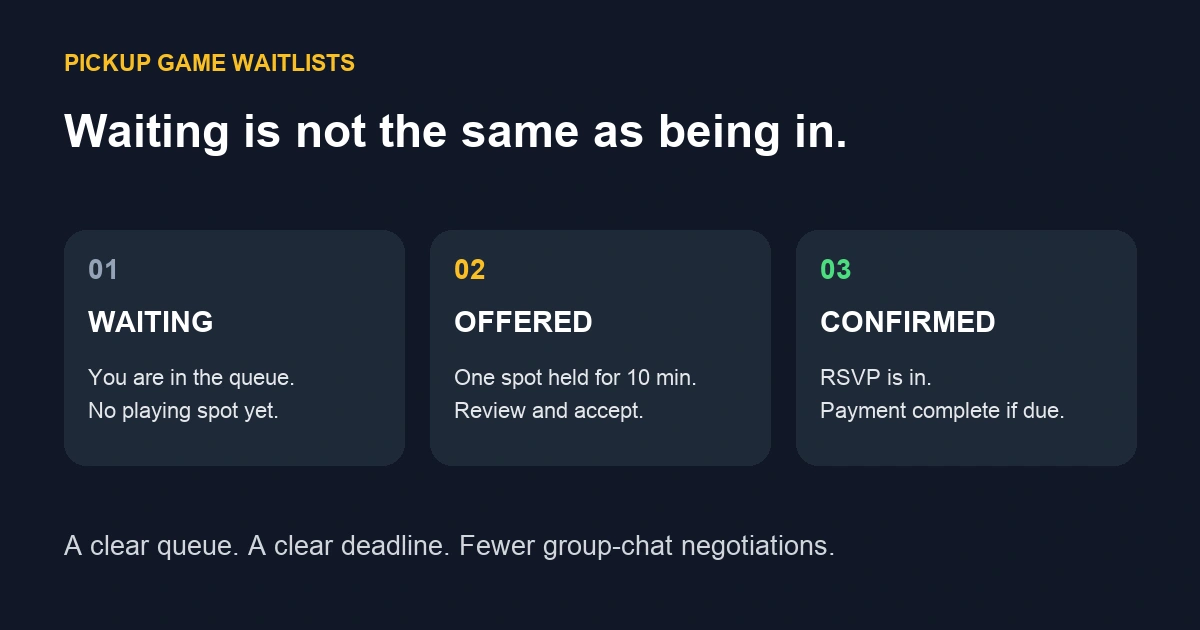
A pickup-game waitlist works when everyone knows three things: who gets the next available spot, how long they have to accept, and what counts as a confirmed RSVP. Put those rules beside the game details before the game fills. Otherwise, your group chat becomes a second roster, maintained entirely through optimism.
This guide explains a practical waitlist policy and the current Beer League web flow. The screenshots use a fictional local pickup group and a deliberately tiny two-player capacity to make each state easy to see. They are real interface captures, not customer data or generated app screens. The hero is an original explanatory diagram; open the full-size diagram.
Separate waiting, offered, and confirmed
- Waiting: the player wants a place but does not have one. They should not assume they can play.
- Offered: a place is temporarily reserved for that player. They still need to respond.
- Confirmed: the player has completed the required RSVP flow, including payment when required, and their attendance shows they are in.
In Beer League, an offer holds one player spot for 10 minutes. It does not automatically RSVP the player or complete payment. It also does not reserve places for their friends. “I’m bringing two people” is a capacity request, not a magic spell.
Write the rules before the first cancellation
Keep your policy short enough that someone can read it while looking for a missing shin guard. Include these details:
- Capacity and roles: state the overall limit and any role-specific limits. A goalie opening is not necessarily a skater opening.
- Queue order: explain that offers follow the queue for the available role, subject to eligibility and any documented manager correction.
- Offer deadline: tell players where to find it and what action accepts the place.
- Price and cancellation terms: make the game cost and your refund policy available before acceptance. A waitlist does not create a new refund policy.
- Guests: explain that additional players need their own available capacity and must follow the group's guest rules.
- Late changes: tell players how to report that they can no longer attend. Updating their RSVP is more useful than announcing it in a conversation nobody can find.
For the broader setup, use our pickup-game organizing guide. This article focuses on what happens after a game or role fills.
What players do in Beer League
1. Join the queue for a full game or role
Open the game and look for Pickup waitlist. When your role is full, choose Join waitlist for my role. If a spot is already available for your role, use the normal RSVP flow instead.
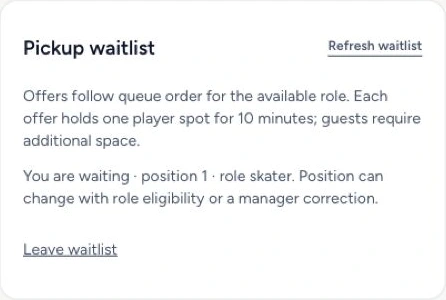
The waiting state shows your position and role. Position is useful context, not a promise that every cancellation goes to you: role eligibility and a manager correction can change the order. Leave the waitlist when you are no longer available.
2. Review an offer before its deadline
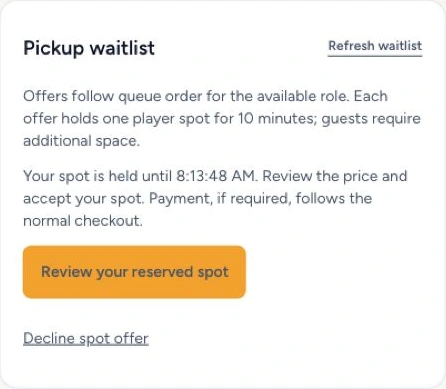
When an eligible place opens, the offer displays a hold-until time and a Review your reserved spot button. Open it, review the price, and complete the RSVP steps before the offer expires. If you cannot attend, choose Decline spot offer so the place can move on.
Use Refresh waitlist to check current status. Do not rely on remembering an earlier message or assume that a notification means your RSVP is complete.
3. Check the final RSVP and payment state
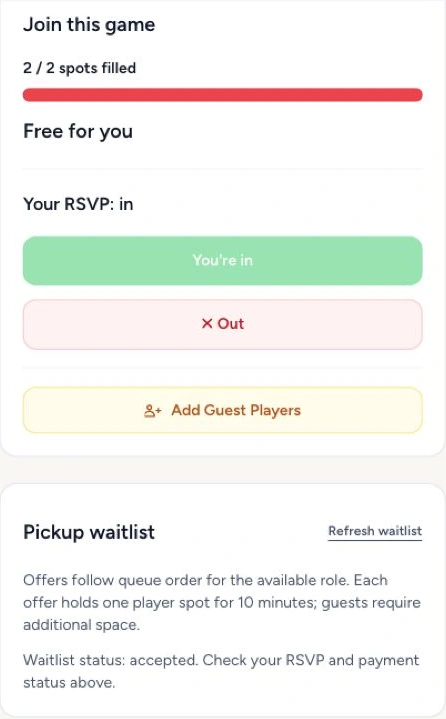
For a free place, reviewing and confirming the RSVP results in Your RSVP: in. For a place requiring payment, acceptance proceeds through the normal checkout. The waitlist label accepted alone is not proof that payment succeeded or attendance is confirmed. Check the RSVP and payment information on the game.
These screenshots illustrate a free player place; paid games add the checkout step.
A cancellation example that keeps everyone informed
Suppose a hypothetical hockey game has separate skater and goalie limits. Jordan is waiting for a skater place; Alex is waiting for a goalie place. A goalie cancels. Alex can receive that role's offer even if Jordan joined the overall queue earlier. That is a role match, not favoritism.
If Alex declines or the offer expires, the system can advance to the next eligible player. If nobody eligible is waiting, the organizer may still need to recruit a replacement. A waitlist organizes available demand; it cannot conjure a goalie from the parking lot.
Managers should explain corrections plainly and record a reason. Beer League's manager controls record reasons for queue corrections; prioritizing a waiting entry does not displace an existing offer. For broader roster decisions, see our guide to handling substitutes.
A message you can copy
This game has limited spots. If your role is full, join the waitlist on the game page. Waiting does not mean you are confirmed. If offered a place, review and accept it before the displayed deadline; Beer League holds the offered player spot for 10 minutes. Complete payment if required, then check that your RSVP is in. Guests need additional space. Please leave the queue or decline an offer if you cannot play. Our cancellation/refund policy is: [link or short policy]. Questions or an incorrect role? Contact [organizer].
Replace the brackets before posting. Keep the same policy on the game details and in your player announcement so people do not have to reconcile three versions of the rules.
The organizer's final check
- Confirm the total and role limits match the game you intend to run.
- Publish the price, guest rules, and cancellation/refund terms.
- Explain the difference between waiting, offered, and confirmed.
- Ask withdrawing players to update their RSVP promptly.
- Use the current game roster for attendance, rather than counting waitlist entries or chat replies.
- Review recurring late cancellations separately; our no-show guide covers that conversation.
Ready to organize the next game? Create your Beer League account and start setting up your pickup group. A clear waitlist leaves you with fewer roster negotiations and more time for the important pregame question: who has the extra pinnies?